

Best AI Ad Resizing Tools for High-Volume Creative Production (2026)
PUBLISHED JULY 3RD 2026
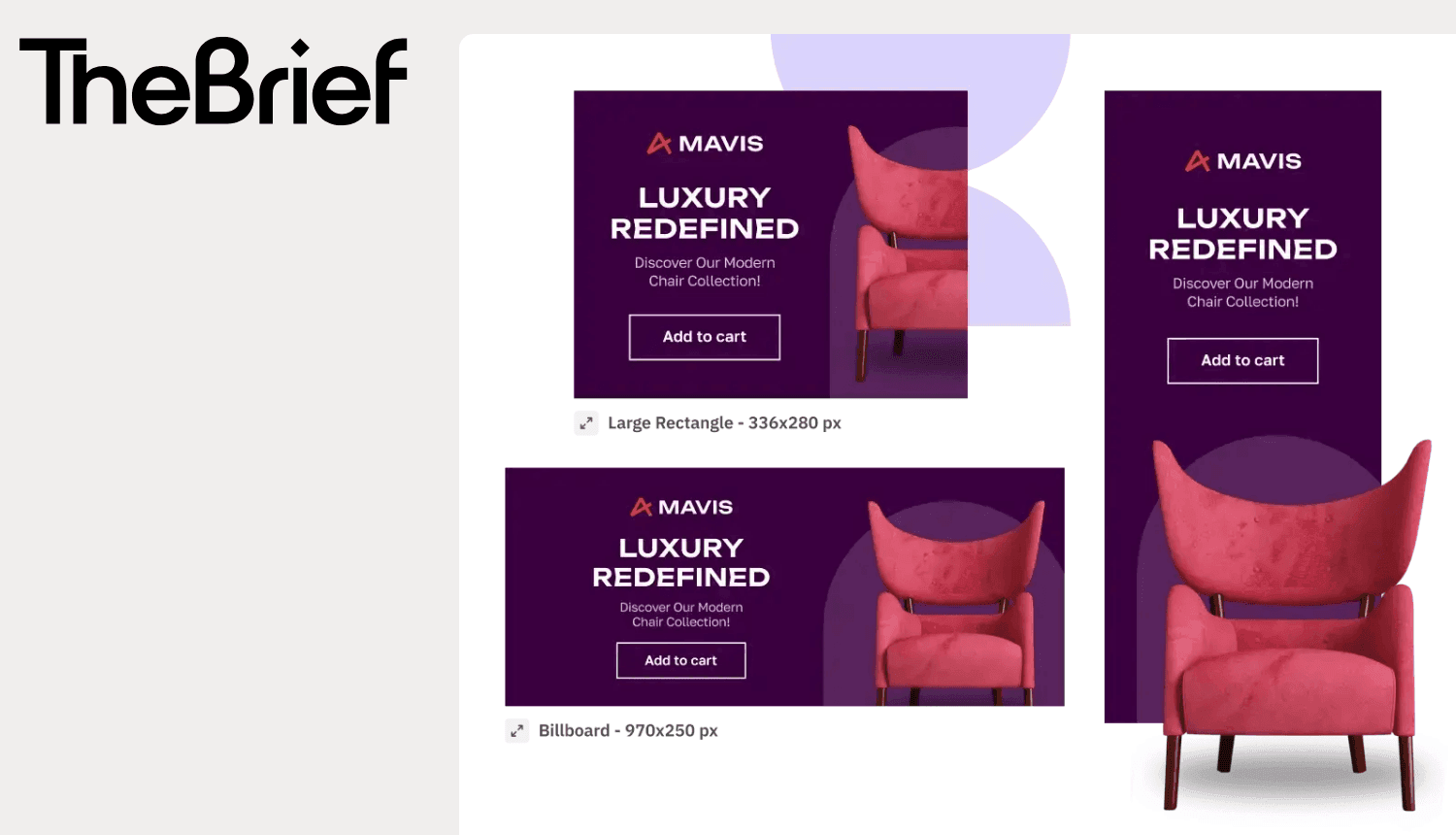
Your designer just spent three hours resizing a single ad into 47 different formats. Tomorrow, they'll do it again for the next campaign, and the one after that.
With global ad spend surpassing $1 trillion in 2026 according to Dentsu, AI ad resizing tools exist to eliminate this exact grind. They transform one master creative into every size your media plan requires, automatically and intelligently. This guide covers how these tools work, what separates the good ones from the mediocre, and which platforms handle high-volume production best.
Why manual ad resizing breaks at high volume
Ad resizing tools streamline marketing workflows by automatically generating and adapting a single ad design into dozens of platform-specific dimensions. The best tools use smart layout rules, AI-driven object detection and batch editing to eliminate manual resizing entirely.
Every ad platform wants something different. Meta asks for square, vertical, and horizontal formats. Google Display Network has over 20 standard banner sizes. TikTok, Pinterest, LinkedIn—each comes with its own specs. Multiply that by the number of campaigns running at any given time, and your design team ends up spending more hours resizing than actually designing.
The downstream effects tend to compound quickly:
- Missed launch windows: Campaigns sit idle while designers manually adjust layouts
- Version control chaos: Tracking dozens of sizes per campaign turns into a mess of "final_final_v8" files
- Designer bottleneck: Creative talent gets stuck in production mode instead of working on strategy
- Brand inconsistency: Rushed resizing leads to off-brand outputs slipping through review
When a team produces hundreds or thousands of ad variants, manual resizing stops being inefficient and starts being unsustainable.
What an AI ad resizing tool is
An AI ad resizing tool is software that uses artificial intelligence to adapt a single ad creative into multiple sizes and formats. Unlike basic image resizers that crop or stretch content, AI-powered tools understand what's actually in the ad, the logo, headline, product image, call-to-action, and make intelligent decisions about repositioning and scaling each element.
The distinction matters. A basic resizer treats your ad like a photo. An AI resizer treats it like a composition with parts that relate to each other.
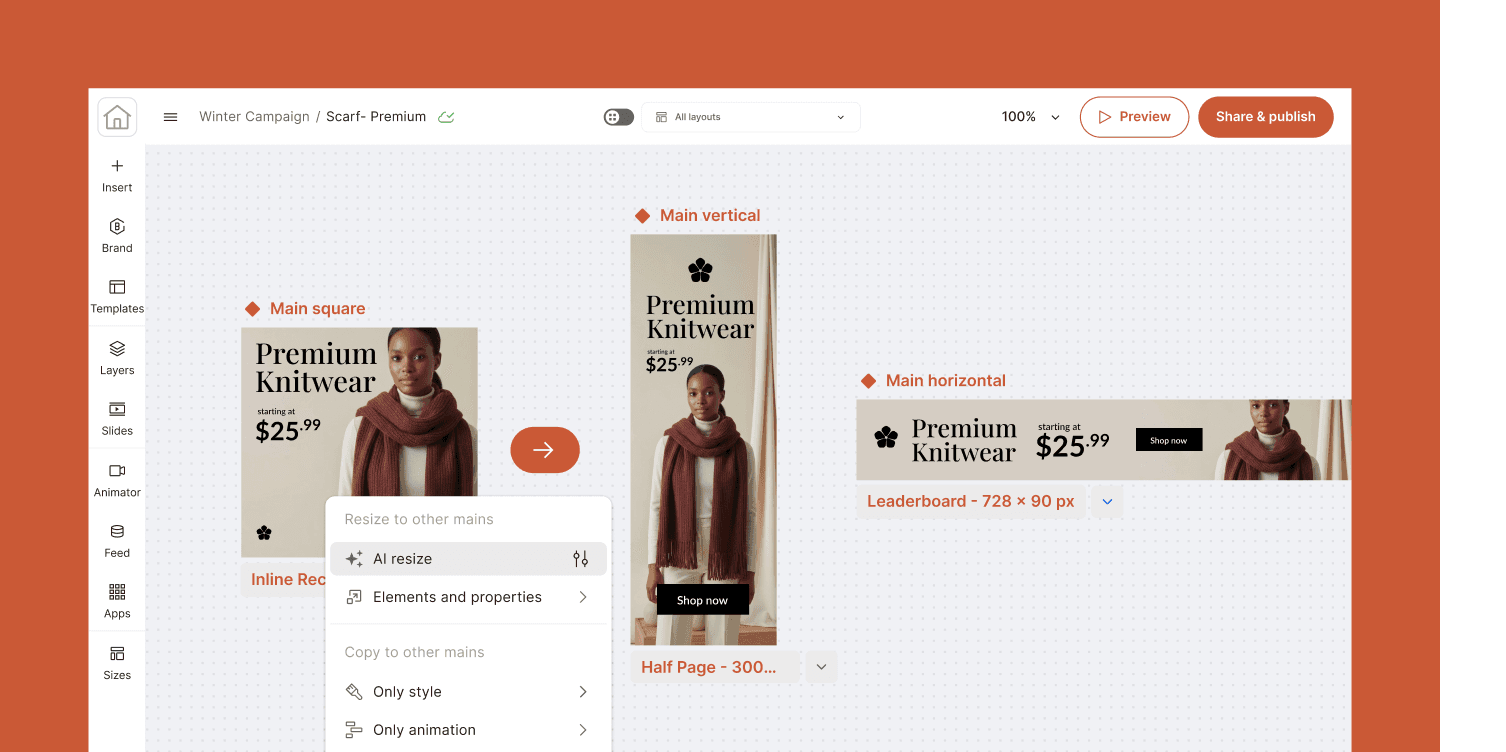
How AI-powered ad resizing works
The process starts with detection systems that analyze your creative before making any adjustments. Rather than scaling everything uniformly, AI tools understand the composition and adapt it thoughtfully for each new dimension.
Object detection for smart scaling
AI identifies key visual elements within your design: products, logos, graphics. During resizing, it prioritizes their placement to prevent awkward cropping or distortion. Your hero product stays front and center even when the canvas shape changes dramatically from a horizontal leaderboard to a vertical story format.
Text detection for readability
The system locates text layers and adjusts font size, positioning, or line breaks so copy stays legible across all output sizes. A headline that works beautifully in a wide banner might wrap differently in a square format. AI handles that adjustment automatically rather than leaving you with text that runs off the edge.
Face and logo detection for composition
AI recognizes human faces and brand marks, keeping them properly positioned and sized. This prevents the awkward cropping that happens when a model's face gets cut off at the forehead or your logo ends up in a corner where it disappears against the background.
Multi-format generation across platforms
From a single master creative, the tool outputs all required dimensions for Meta, Google Display Network, programmatic DSPs, and social platforms at once. What used to take hours of manual work happens in seconds.
What to look for in an AI ad resizing tool
Not all resizing tools deliver the same results. Here's what separates solutions that actually save time from those that create new problems.
Multi-platform format coverage
A good tool supports all major ad networks and social platforms with pre-built size templates that stay current as platforms update their specs. Discovering mid-campaign that your tool doesn't support the latest Instagram format is a frustrating setback.
Smart scaling without quality loss
Look for AI-driven resizing logic rather than simple cropping. Output maintains resolution and visual balance. If elements are just getting stretched or squished, you'll end up fixing things manually anyway, which defeats the purpose.

Brand governance and compliance controls
For enterprise teams, locked brand elements, approval workflows and design permissions ensure every variant remains perfectly on-brand. This becomes especially important for maintaining visual consistency at scale, preventing non-designers from altering core logos, shifting corporate hex codes or breaking typography rules during the automated generation process.

Integration with design tools and ad platforms
Native connections to Figma, Adobe Creative Cloud, and ad managers reduce the export/import dance that eats up time. Fewer handoffs mean faster workflows. The Brief's integrations connect your existing marketing stack directly to the production process.

Localization and translation support
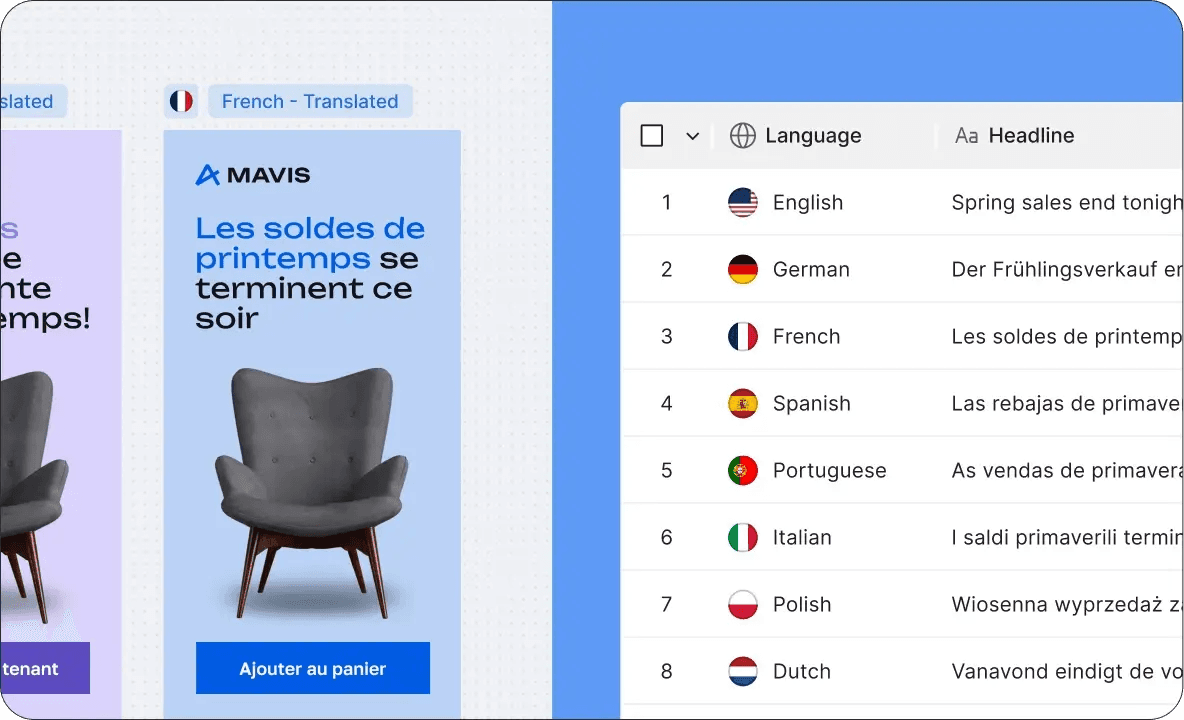
For global campaigns, the tool handles text swaps for different languages and adjusts layouts for varying text lengths. German copy runs notoriously longer than English, a good tool accounts for that without breaking your layout.
Performance and creative analytics
Advanced tools connect resized variants to performance data, helping teams understand which formats and creative choices actually drive results. This closes the loop between production and optimization.

The best AI ad resizing tools for multi-platform ad production
| Tool | Best for | Key strength |
|---|---|---|
| The Brief | Enterprise marketing teams | Connected AI system with full campaign lifecycle |
| Celtra | Large-scale creative automation | Dynamic creative optimization |
| Bannerflow | Display advertising teams | Banner production and management |
| Smartly | Social advertising at scale | Meta and TikTok ad automation |
| Canva | Small teams and solopreneurs | Ease of use and accessibility |
| AdCreative.ai | Performance marketers | AI-generated ad concepts |
| Rocketium | E-commerce and retail | Product feed-driven creative |
| Storyteq | Video and dynamic creative | Video ad automation |
| Abyssale | Programmatic display | API-first batch generation |
| Adobe Express | Casual users | Quick resizing for social |
The Brief
The Brief treats resizing as part of a connected campaign workflow rather than an isolated feature. Built by marketers who lived the pain of fragmented tools, it combines AI-powered resizing with brand governance, approval workflows and integration across the entire creative production process. For enterprise teams tired of juggling point solutions, it offers a unified system where resizing feeds directly into review, approval and structured asset export.
Celtra
Celtra is an enterprise-grade creative automation platform used by large brands and agencies. Its strength lies in dynamic creative optimization and scaling personalized ads across markets and audiences.
Bannerflow
Bannerflow focuses on display advertising production. Teams producing high volumes of banner ads appreciate its collaborative workflow features and the ability to update all sizes from a single master file.
Smartly
Smartly is a social-first platform with deep Meta and TikTok integrations. If ad spend concentrates on social channels, its automation for scaling and optimization is particularly strong.
Canva Magic Resize
Canva Magic Resize offers accessible one-click resizing as part of Canva Pro. It works well for smaller teams or quick social content, though it lacks the enterprise governance features larger organizations typically require.
AdCreative.ai
AdCreative.ai goes beyond resizing to generate ad concepts using AI. Performance marketers who want AI to help with creative ideation—not just production—find value here.
Rocketium
Rocketium works well for e-commerce teams with product catalogs. It connects to product feeds to automate creative generation at scale, making it a fit for retail brands with thousands of SKUs.
Storyteq
Storyteq specializes in video and dynamic creative. Teams producing video ads across multiple formats and lengths benefit from its automation capabilities.
Abyssale
Abyssale takes an API-first approach for programmatic teams. Its batch generation capabilities suit high-volume display campaigns where automation depth matters more than a polished interface.
Adobe Express
Adobe Express offers consumer-friendly resizing for quick social content. It feels familiar for Adobe users, though its automation is limited compared to enterprise solutions.
How to choose the right AI ad resizing tool for your team
Match the tool to your production volume
Casual users benefit from simplicity. High-volume teams benefit from automation depth and batch processing capabilities. Being honest about actual production volume helps avoid overbuying complexity or underbuying capacity.
Evaluate brand and compliance requirements
Regulated industries and enterprise brands benefit from governance features that consumer tools don't offer. Approval workflows, locked elements, and audit trails matter when compliance is on the line.
Audit your existing creative stack
Consider what tools your team already uses daily. A resizing tool that integrates with existing design software and ad platforms reduces friction. One that requires constant exporting and importing adds it.
Prioritize connected workflows over point solutions
Isolated resizing tools create handoff problems. Platforms that connect resizing to the broader campaign lifecycle (briefing, production, launch, optimization), deliver compounding value over time. Moving beyond fragmented point solutions is one of the most impactful decisions a marketing team can make.
The ROI of automated ad resizing at scale
The business impact of automated resizing extends beyond time savings, though time savings alone can be significant. McKinsey estimates generative AI could add up to $463 billion annually in marketing productivity alone.
- Time reclaimed: Designers shift from manual resizing to strategic creative work
- Faster launches: Campaigns go live in hours instead of days
- Lower production costs: Fewer assets require manual designer intervention
- More variants tested: Higher volume enables data-driven creative optimization
- Consistent brand execution: Every output adheres to guidelines automatically
The real return isn't just efficiency. It's strategic reallocation. NCSolutions research found creative quality accounts for 49% of a brand's sales lift—the single largest factor in advertising effectiveness. When a creative team stops spending half their time on production busywork, they can focus on the high-value work that actually moves results.
Move from resizing busywork to strategic creativity
Resizing is exactly the kind of tedious, repetitive task that benefits from automation. It requires precision, not creativity. It demands consistency, not inspiration. It's work that machines handle better than humans—and work that keeps humans from doing what they do best.
The right AI ad resizing tool doesn't just save time. It gives your team space to focus on strategy, big ideas, and the creative work that only humans can do.
Machine precision. Human brilliance.
Frequently asked questions about AI ad resizing tools
Can AI ad resizing tools handle video ads as well as static images?
Some tools support video resizing and reformatting, but capabilities vary widely. Checking whether a tool can adjust aspect ratios, reframe key elements, and export to platform-specific video specs is worth doing before committing.
Do AI ad resizing tools integrate with Figma and Adobe Creative Cloud?
Many enterprise tools offer native integrations with Figma, Photoshop, and Illustrator. This allows teams to import designs directly without manual export steps.
How does AI resizing accuracy compare to manual designer work?
AI resizing handles the vast majority of formats correctly. Complex layouts or unusual compositions may still benefit from manual refinement, but for standard ad formats, accuracy is typically high enough to eliminate most production work.
Are there free AI ad resizing tools for small teams?
Tools like Canva offer free tiers with basic resizing. Advanced features like batch processing, brand controls, and platform integrations typically require paid plans.
Can AI ad resizing tools maintain brand consistency across hundreds of variants?
Enterprise-grade tools include brand governance features like locked colors, fonts, and logo placement rules. These enforce consistency automatically across all generated outputs.
7 days free on us
Let's put these insights into action. Build, scale, and automate campaigns with AI-powered workflows.

