

Best AI tools for product photography that actually look real in 2026
PUBLISHED MAY 8TH 2026
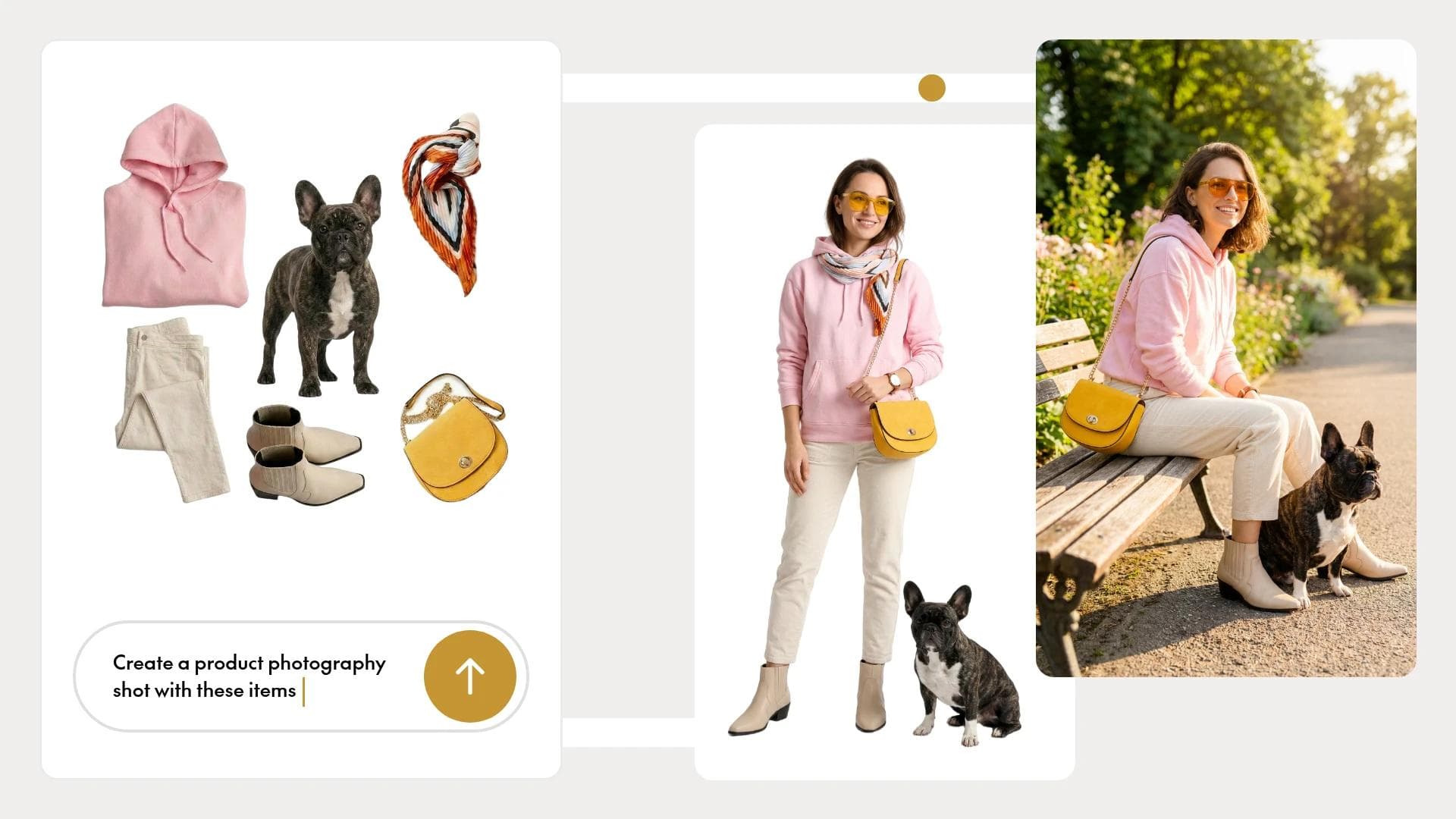
Product photography used to mean studio rentals, photographer day rates, and waiting weeks for final edits. Now you can upload a product shot, type "on a marble countertop with soft morning light," and have a campaign-ready image in under a minute.
AI product photography tools use generative AI to create realistic backgrounds, lighting, and scenes around your existing product images—no physical shoot required. This guide covers how these tools work, what separates convincing results from obvious fakes, and which options actually deliver for marketing teams producing ads at scale.
What is an AI tool for product photography
Top AI product photography tools like Photoroom, Pebblely, and Claid.ai generate professional, studio-quality lifestyle images from simple smartphone shots in seconds. Instead of booking a photographer, renting a studio, and coordinating props, you upload a product image and describe the scene you want. The AI handles the rest.
These tools work by analyzing your uploaded product and generating new visual elements around it. Type something like "ceramic mug on a wooden table with morning light," and the AI renders that environment while keeping your product accurate and in focus.
Three core capabilities define this category:
- Background generation: Creating environments from text descriptions
- Lighting simulation: Adding realistic shadows, reflections, and light sources
- Scene composition: Positioning products naturally within generated contexts
Some tools extend further into AI-generated models for apparel or batch processing for entire catalogs. The common thread is replacing manual studio work with automated generation.
Why marketers are replacing studio shoots with AI product photography
Traditional product photography involves a lot of coordination. Studio bookings, prop sourcing, photographer schedules, and post-production editing can stretch a simple shoot into a weeks-long project. And that's before factoring in cost.
AI product photography removes most of those bottlenecks:
- Cost reduction: No per-shoot expenses for backgrounds, lighting setups, or physical props
- Speed to market: Campaign-ready images in minutes rather than weeks of vendor coordination
- Creative flexibility: Test multiple scenes, seasons, or contexts without rebooking anything
- Scale without bottlenecks: Hundreds of variants from a single product image
For teams running performance campaigns, this speed changes what's possible. McKinsey estimates agentic AI can accelerate campaign creation 10–15x, so when you can generate fifty ad variants in an afternoon instead of waiting two weeks for a reshoot, you can actually test what resonates with your audience.
What separates realistic AI product photos from obvious fakes
Not all AI-generated product images look convincing. The difference between "obviously AI" and "could be a real photo" comes down to a few quality markers.
Lighting consistency is the biggest tell. Realistic AI images match shadow direction, intensity, and color temperature across the product and background. If your product has warm studio lighting but sits on a background with cool daylight shadows, viewers notice - even if they can't articulate why it looks off.
Other markers worth checking:
- Shadow placement: Shadows that anchor products to surfaces and follow consistent light sources
- Reflections: Glossy products showing appropriate environmental reflections
- Perspective accuracy: Product angles matching the implied camera position
- Edge integration: Clean transitions between product and background without halos
- Proportion consistency: Products maintaining accurate size relationships with surrounding elements
Better tools handle these details automatically: high-quality product photos drive 94% higher conversion rates than low-quality ones. Lower-quality options often produce images that look fine at thumbnail size but fall apart on closer inspection.
Must-have features in an AI product photography tool
When evaluating tools, look beyond the headline feature of "generates backgrounds." The capabilities that actually matter depend on how you plan to use the images and at what scale.
AI photoshoot and background generation
This is the core feature: describe a scene in text, and the AI generates it around your product. Better tools offer style presets (minimalist, lifestyle, seasonal) alongside custom prompting. You get speed when you want it and control when you need it.

On-model and AI fashion photography
For apparel brands, AI-generated models wearing products eliminate the logistics of model bookings and studio time. Look for pose libraries, diverse model representation, and accurate fabric rendering. Clothing that drapes naturally rather than looking pasted on.
Bulk and catalog-scale generation
If you're managing hundreds of SKUs, one-at-a-time generation won't cut it. Batch processing lets you apply consistent styles across entire product lines, maintaining visual coherence while saving hours of repetitive work. Tools with a batch ad design generator capability extend this logic directly into ad production.

Background removal, upscaling, and retouching
Foundational editing features often come bundled with generation tools. Automatic background removal, AI upscaling for higher resolution outputs, and light correction handle the prep work before generation and the polish after.
Brand consistency and style controls
Templates, style presets, and saved brand settings ensure every generated image feels like part of the same family. This matters especially when multiple team members create assets or when you're producing content across campaigns.

Integrations with ad platforms and creative workflows
The most useful tools connect to where your images actually go. API access, direct publishing to ad platforms, and connections to design tools reduce the manual export-upload-resize cycle that eats into production time.
Best AI tools for product photography
Each tool below serves a different use case. The right choice depends on your volume, workflow, and how the images fit into your larger marketing operation.
| Tool | Best for | Key strength | Pricing model |
|---|---|---|---|
| The Brief | Teams scaling high-fidelity product imagery | Generating realistic product photography or lifecycle scenes | Subscription |
| Claid | E-commerce photo | API-first with bulk editing | Usage-based |
| Pebblely | Quick background swaps | Template library and ease of use | Freemium |
| Pixelcut | Solo sellers and small shops | Free tier with style presets | Freemium |
| Canva AI Product Photos | Teams already in Canva | Native integration with design suite | Subscription |
| Photoroom | Mobile-first editing | Background removal accuracy | Freemium |
| Flair AI | Branded lifestyle scenes | Text prompt quality | Usage-based |
The Brief
The Brief treats product photography as a piece of a larger campaign. Product images can be placed in diverse settings or on AI models to create professional shots, and you can even turn them into moving video presentations if you need a moving product display. These assets flow directly into ad variants to be downloaded or launched from the platform to eliminate tool handoffs and the manual production bottleneck.
Claid
Claid focuses on e-commerce at scale, offering API-first tools for automated photo enhancement, upscaling to 4K, and background generation. It's built for platforms and teams processing large catalogs where consistency and accuracy (preserving labels, logos, product details) matter more than creative experimentation.
Pebblely
Pebblely makes background generation accessible with a library of pre-built templates - rustic kitchen, sunny beach, marble countertop. The learning curve is minimal, making it a solid starting point for teams new to AI product photography.
Pixelcut
Pixelcut offers a generous free tier with style presets suited for independent sellers and small businesses. The interface prioritizes simplicity over advanced controls, which works well for straightforward product shots but limits customization for complex scenes.
Canva AI Product Photos
For teams already working in Canva, the AI Product Photos app adds generation capabilities without switching tools. The integration is seamless, though the feature set is more limited than dedicated product photography tools.
Photoroom
Photoroom started as a background removal tool and expanded into AI generation. The mobile app makes quick edits accessible anywhere, and background removal remains among the most accurate available. The free tier includes watermarks on outputs.
Flair AI
Flair AI emphasizes prompt-driven control, letting you describe detailed scenes and adjust composition through a drag-and-drop canvas. It's well-suited for branded lifestyle photography where precise placement of props and products matters.
How to create realistic product photos with AI
The workflow is straightforward once you understand what each step requires.
Step 1: Choose a photoshoot style or scene
Start with a template if you want speed, or describe a custom scene if you have something specific in mind. Think about where your product would naturally appear and what context helps customers imagine using it.
Step 2: Upload a clean product image
Quality in, quality out. Use a photo with a white or transparent background, even lighting, and sharp focus. Multiple angles help some tools generate more accurate results, though most work fine with a single hero shot.
Step 3: Prompt the background and lighting
You can be specific. "On a wooden table" produces generic results. "On a weathered oak table with warm morning light from the left, soft shadows, minimal props" gives the AI more to work with for the context. Include surface textures, lighting direction, and atmosphere.
Step 4: Generate variants for testing
Create multiple versions with different scenes, angles, or contexts. These variants become your testing pool for ads. Different backgrounds resonate with different audiences, and you won't know which performs best until you run them.
Step 5: Refine, approve, and export
Review outputs for the quality markers mentioned earlier: lighting consistency, shadow placement, edge integration. Make minor adjustments if the tool allows, then export in the formats and dimensions your platforms require.

How to generate product photos at scale across a full catalog
Bulk generation requires a slightly different approach than one-off images. The goal is consistency across hundreds of SKUs while maintaining quality.
- Upload your product catalog with consistent image specifications (same background, similar lighting, comparable angles)
- Apply a single style template or prompt across all items
- Review generated batches using approval workflows - spot-check rather than reviewing every image individually
- Export in platform-specific formats and dimensions
The tools that handle scale well offer batch processing, consistent style application, and quality control features that flag outliers for manual review. Teams looking to generate ads at scale benefit most from platforms that connect image generation directly to campaign production.
Free AI product photography tools worth trying
If you're testing AI product photography before committing budget, several tools offer free tiers:
- Pixelcut: Free tier with basic styles and limited generations per month
- Pebblely: Free plan for low-volume testing with watermarks
- Canva AI Product Photos: Available within Canva free accounts with usage limitations
- Photoroom: Free mobile app with watermarked outputs
Free tools work well for experimentation and proof-of-concept. However, they typically lack the workflow integrations, brand controls, and batch processing that production-scale work requires.
Turning AI product photos into on-brand ad variants
Product photography is rarely the end goal. It's an input for ads, social content, and marketing campaigns. The real efficiency gain comes when generated images flow directly into creative production.
This is where connected systems outperform standalone tools. Instead of generating a product photo, downloading it, uploading it to another tool, resizing it for each platform, and manually creating ad variants, an integrated workflow handles that chain automatically. Creative automation tools are increasingly designed to close exactly this gap.
The Brief's AI agents, for example, can take a product photo and generate dozens of on-brand ad variants ready for testing across Meta, Google, and other platforms. Each variant maintains brand consistency while adapting to platform specifications - no manual resizing, no repeated uploads, no version control headaches.
Frequently asked questions about AI product photography tools
Are AI-generated product photos legal to use in ads?
Yes, AI-generated product photos are generally legal for advertising as long as the product representation is accurate and not misleading to consumers. The standard rules around truthful advertising still apply: your AI-generated image shouldn't show features or qualities the actual product doesn't have.
How accurate is product representation in AI-generated photos?
Accuracy depends on your source image quality and the tool you choose. Most AI tools preserve product details well, but colors can shift slightly and fine text or logos sometimes blur. Always review outputs against your actual product before publishing.
Can AI product photography fully replace a professional photographer?
For standard product shots and background generation, AI handles the work effectively. Professional photographers remain valuable for hero imagery, complex compositions requiring physical styling, and shoots where creative direction benefits from human judgment and real-time adjustments.
Do AI product photos meet Amazon and Shopify listing requirements?
Most AI tools can generate images that meet marketplace requirements, though you may need to adjust outputs. Amazon's main image requirements (pure white background, product filling 85% of frame) differ from lifestyle image guidelines. Check platform-specific rules and configure your tool accordingly.
How long does it take to generate a product photo with AI?
Individual images typically generate within seconds to a few minutes. Bulk processing of larger catalogs takes longer depending on the tool and volume. Expect anywhere from minutes to hours for hundreds of SKUs, with most of that time being processing rather than active work.
7 days free on us
Let's put these insights into action. Build, scale, and automate campaigns with AI-powered workflows.

